Paste a public media link from YouTube, Facebook, Instagram Reels, TikTok, Twitter/X, or Dailymotion and review the available MP4 quality options.
Use SaveVidTool only for videos you own, content you created, public-domain material, licensed media, or content you have permission to save. Respect copyright, privacy settings, and each platform's terms.
SaveVidTool is built for people who need a simple way to check public media links and save content they are allowed to keep. This free online video downloader works in your browser, so you can review available video information without installing extra software. It is useful for backing up your own uploads, saving licensed educational material, or keeping public-domain media for offline personal use.
Use one tool as a YouTube video downloader, Facebook video downloader, Instagram Reels downloader, TikTok video downloader, Twitter/X video downloader, and Dailymotion video downloader. Simply paste the video URL, fetch the details, and choose from the available quality options returned for that public link.
SaveVidTool does not give permission to copy someone else's work. Before downloading, make sure you own the content, have permission from the rights holder, or are using media that is legally available for download.
Check public media links, review available formats, and save permitted videos responsibly.
Download high-quality MP4 videos with ultra-fast speed.
Convert videos to MP3 with crystal-clear audio quality.
Download videos in 720p, 1080p, 4K, and 8K ultra HD.
Use the tool only for your own content, licensed media, or files you have permission to save.
Use SaveVidTool on your Android phone to check public media links from supported platforms. Paste a link, fetch details, choose the available quality, and save permitted MP4 videos more easily on mobile.
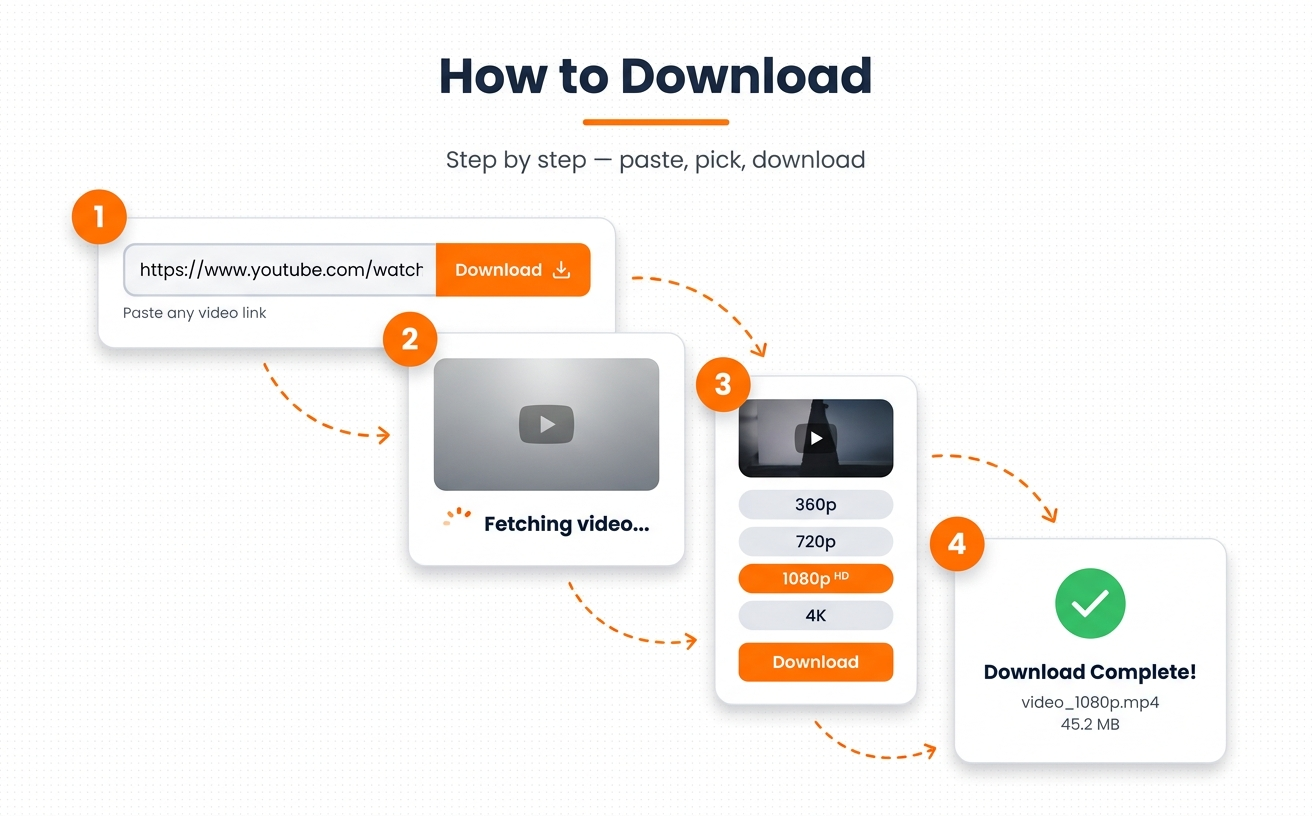
All you have to do is copy the URL of the video you want to download.
On the tool area above, paste the URL in the space provided.
Click on the “Download Video” button given below or Hit Enter on the keyboard to start processing.
We provide multiple video quality formats to download. Select one that you like.
Click the “Download” button, and on the new page, click the three vertical dots to download the video.
Download in 720p, 1080p, 2K, 4K & even 8K.
Review available audio options when the source provides them.
Copy, paste, and download instantly.
Compatible with PC, Mac, iPhone & Android.
No. You should download only content you own, content you created, public-domain material, licensed content, or media you have permission to save. Public visibility does not always mean free reuse.
No. SaveVidTool processes user-submitted URLs and shows available technical options when possible. The original media remains with the source platform or the original rights holder.
A link may be private, deleted, region-limited, login-protected, age-restricted, or unavailable in a downloadable format. Platforms also change their formats and access rules frequently.
Only if you have the legal right to do so. Reposting someone else's work without permission may violate copyright law, platform rules, or privacy rights.
No. SaveVidTool is intended for public links and authorized content. Do not use the service to bypass private accounts, paywalls, restricted posts, or access controls.
Rights holders can review our Copyright and DMCA Policy and contact us with the relevant URL, ownership details, and a clear description of the concern.
